


Convert PDF to TIFF
Companies that use e-faxing may need to convert PDF files to the TIFF format. Universal Document Converter will automate PDF to TIFF conversion that can be applied on any variations of the PDF and TIFF formats.
On this page:
- How to convert PDF to TIFF?
- Avoiding the corrupted fonts issue using “Print as image”
- Convert PDF to TIFF in batch mode
- Automatic Conversion from PDF to TIFF in the office environment
- PDF to TIFF Conversion Code Examples for Developers
How to Convert PDF to TIFF
The easiest way to convert PDF to a TIFF file is to print it using a virtual printer. A virtual printer differs from a regular one in the way it handles the files – instead of printing the image on paper it will save it in the preferred format.
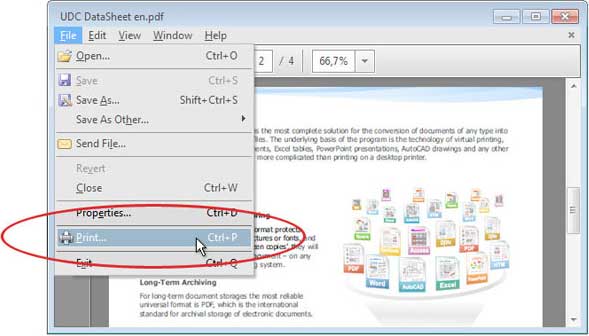
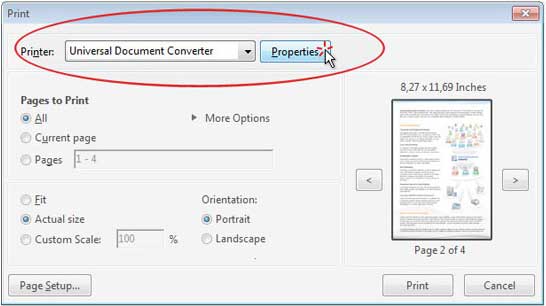
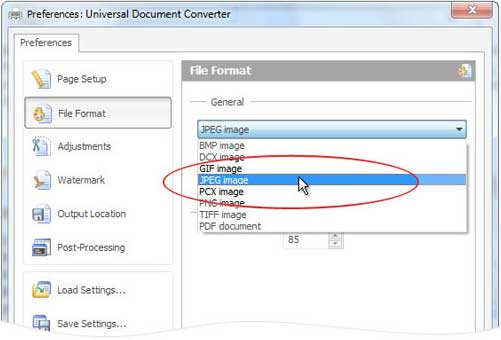
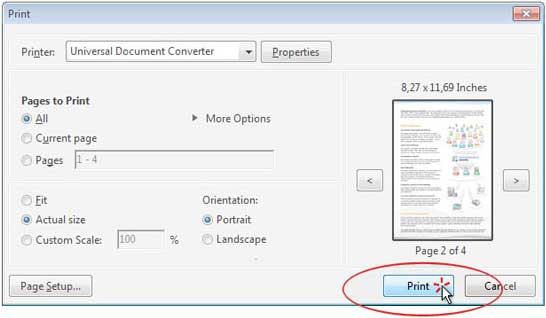
To convert PDF to TIFF, download and install the Universal Document Converter. Then, please follow this manual
Avoiding the Corrupted Fonts Issue Using “Print as image”
Although you may see the fonts and images that the file contains represented accurately on the screen, they may fail to be represented same accurately on paper. This happens because programs like Adobe Reader use different algorithms for image display that may not be interpreted in the correct way by other devices and programs.
To solve the problem please follow the instruction:
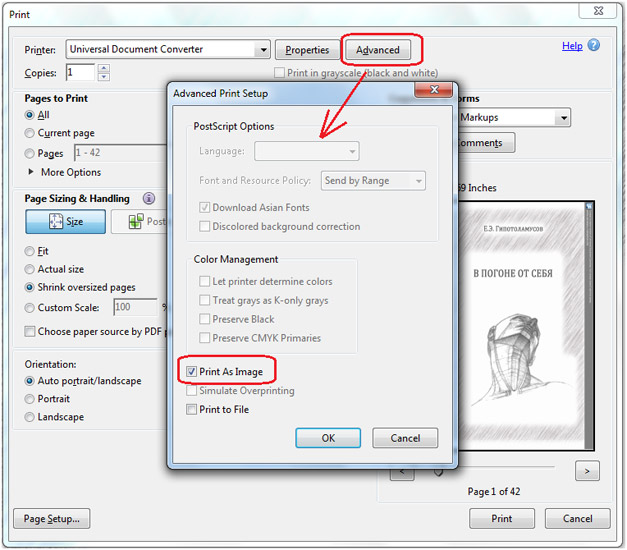
- Open PDF and press File->Print in Adobe Reader menu
- Select Universal Document Converter from the list of printers and click Advanced
- Click Print as image as shown on the screenshot below
- Click OK to save the introduced settings and click Print to start the PDF to TIFF conversion process
Convert PDF to TIFF in Batch Mode
To convert your PDF files to the TIFF format in batch mode you will need three programs: Adobe Reader (or Adobe Acrobat), Universal Document Converter, and Print Conductor.
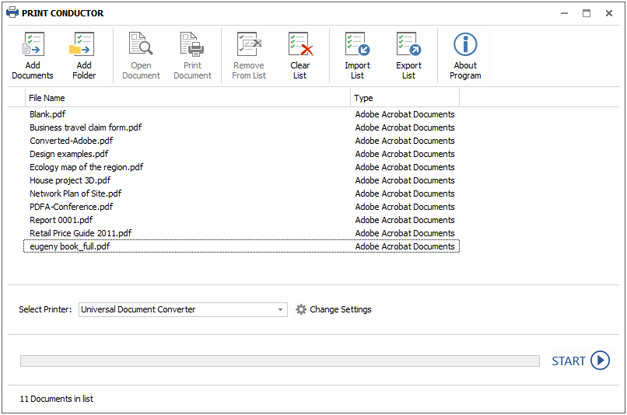
- Start Print Conductor and add your PDF files to the list
- Select the Universal Document Converter printer
- Click Change Settings and specify TIFF Image as the output file type
- Click Start to begin converting a number of PDF files to TIFF:
Automatic Conversion from PDF to TIFF in the Office
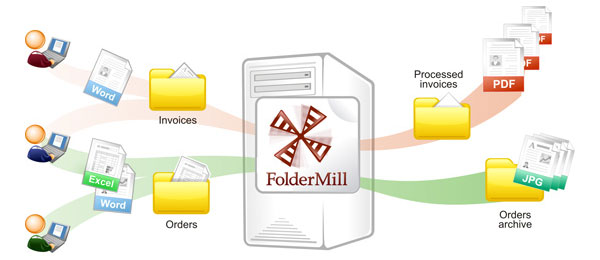
Situations when the files received by the company are saved in the format that the company employees will need to convert to a different one, are very common. To introduce automatic conversion settings use FolderMill – the software that has been designed to closely monitor all the file extensions of the incoming files and will automatically convert them to the specified format.
For example, if you receive the files saved as PDF but need to convert them to TIFF, this will become possible after you specify this rule to the Folder Mill software.
PDF to TIFF Conversion Code Examples for Developers
Universal Document Converter contains public API, code examples and other resources that may be helpful for the software developers. Our resources can be used for similar conversion projects.
Here are some examples on how to set PDF to TIFF conversion in different programming languages.
Related conversion tutorials:
-

Dr. Gisella Brandani
Dental Practice, Florence, Italy
«I use the software when I need to convert many types of files into JPEG using the certified email system with Thunderbird. Only using the JPEG format I can see the attachments displayed in open view in the receipt.»